TIC2002 Introduction to Software Engineering
Module overview
TIC2002 Introduction to Software Engineering contains roughly a 50-50 balance of theory and practice of SE. It covers the knowledge/skills necessary to do small software projects, and as such, it is a first step towards preparing you to work in bigger SE projects, which will be done in later modules.
This module is optimized for SCALE students so that you can learn at your own pace even if you are not a full-time student: the need to attend lectures/tutorials at fixed times is low, deadlines are more flexible than usual, and the on-campus presence is optional.
e.g., Instead of traditional instructor-led tutorials, the module provides quizzes and other activities that you can do at your own time to self-test your knowledge. The instructor can be consulted if you need help with any of them.
Using this module website
The Schedule page is your main source of information for TIC2002. You will need to refer to it weekly. For an overview of the full schedule, refer to the Full Timeline page.
More details for the upcoming weeks will be added as the weeks progress. In general, information given for more than 1 week into the future should be treated as tentative.
Browser compatibility
Most of this will work on most mainstream Browsers, but embedded slides are best viewed using Chrome.
Information layers
This book tries to layer information so that readers can decide to omit less important layers if they wish to.
More important information are in bold or highlighted while less important information are dimmed or in collapsed panels such as the below.
Tabs indicate alternative formats of the same content (e.g. video vs text). You can choose the one you like and ignore the other tabs.
Some textual description of X
Video describing X
Dotted underlines indicate some additional infotool tips (activated by hovering over it) and dashed underlines indicate modal windows (activated by clicking) containing additional information.
Tooltip ExampleThis website uses a star rating system to indicate the priority level of contents.
Conventions used
Shorthand headings
Meaning of some shortened headings:
- What : the meaning of the concept in concern ( example)
- Why : the motivation behind the concept in concern ( example)
- How : the usage of the concept in concern ( example)
- When : the pros and cons of the concept in concern, when to use the concept ( example)
Meaning of icons
: additional info
: warning
: positive message
or : important message
: error or danger to avoid
or : tip
: definition or topic
extra : tangential info, can be ignored if not interested
: Ctrl+Click to open the LO in new window/tab.
: learning outcomes
: prerequisite learning outcome
: examples
: resources
: exercises
: printable version
: preview/more info
: video
>_ : a command to be run in a terminal
: textual description
: slides
: output produced by running code
question without answer
question with answer
: tasks to do
: lecture
: tutorial
: evidence you can use to prove you have achieved a learning outcome
⏰ : deadline
Searching for keywords
Use the search box in the top navigation bar to search for keywords in the website pages. If you cannot find the content related to a keyword, let us know by posting in the forum so that we can add the missing keyword to our search index.
Saving as PDF files
Follow this guide @SE-EDU/guides.
Printing Textbook Content
Printer-friendly version (indicated by icon) have been provided for each chapter and the whole book. You can use them for saving as pdf files or printing.
Making this Website Better
This website was generated using the MarkBind software developed at NUS. We welcome bug reports, suggestions, and contributions, to be submitted at the website issue tracker.
Instructors

Damith Chatura RAJAPAKSE (Module Coordinator)
Associate Professor, NUS School of Computing
PhD, Software Engineering, NUS, 2002-2006
BSc, Computer Science & Engineering, University of Moratuwa, 1996-2001
damith[at]comp.nus.edu.sg
COM2-02-57
651 64359
https://www.comp.nus.edu.sg/~damithch
Lectures + Tutorials
Tuesdays 6.30-9.30pm
Online + (optional: LT19)
A TIC2002 lecture + tutorial time is divided into three parts, as follows:
- [6.30-7.00pm] Pre-lecture consultations:
- You can use this time to get prof's help if you encountered problems while doing the previous week's tasks.
- This session will be online. Communications with the prof is to be done using Microsoft Teams app.
- If the question is is potentially relevant to others in the class, post your question in the chat room of the
TIC2002_2021(link) MS Team. - Otherwise search for prof's name (
Damith Chatura RAJAPAKSE) in MS Teams and send a private chat message.
- If the question is is potentially relevant to others in the class, post your question in the chat room of the
- [7.00-8.00pm] Lecture briefing:
- Will be done via Zoom.
- You are encouraged to attend the Zoom session as there could be in-lecture activities. But a recording will be made available in case you can't attend the live Zoom session.
- [8.00-9.30pm] Post-lecture consultations:
- This portion will start as soon as the previous portion (i.e., the lecture briefing on Zoom) ends.
- During this time,
- go through the week's lecture topics in the module website
- do suggested activities/exercises in there (if any)
- if you encounter any problems while doing the above or have a question, contact the prof using MS-Teams, similar to the pre-lecture consultations explained above.
If you prefer face-to-face interactions during this portion, I can come to meet you f2f in LT19 (it's just a short walk from my office where I'll be doing the Zoom lecture).
Lecture slides are not suitable to be used as reference materials as they have been i.e., heavy use of graphics and animationsoptimized for lecture delivery instead. Use the textbook (not slides) as your main reference. Slides can be uploaded to LumiNUS if requested, after the lecture.
Textbook
This module is supported by a customized online textbook Software Engineering for Self-Directed Learners (TIC2002 edition), integrated into this module website. While it is in a dynamic Web page format, there is a way to save the main text as pdf files. Printer-friendly versions have been provided too. In addition, a PDF version of the full textbook will be provided at the start of the semester, via LumiNUS.
Programming language
This module uses Java. It assumes you are familiar with C++ basics and provides lessons to help you transition from C++ to Java.
Install JDK 11 on your computer. Using other versions of Java is highly discouraged.
Programming exercises
In some weeks, there will be some programming exercises for you to submit (on Coursemology). You should do the exercises as you learn the topics.
Focus on learning the topic rather than finishing the exercises. While these are exercises provided to self-test your knowledge, the more important thing is to read and understand the topic content. Furthermore, not all topics are tested by exercises.
Programming exercises are graded for participation.
Project
- The project is to be done individually.
- The project based on a generic project called Duke.
- In the project, you will build a small chatbot, using Java.
- The project is to be done in small increments. You will be given a schedule of what increments to be done in each week.
- Some weekly increments will be common to all students, while some will vary from student to student. That means your final product will be unique in terms of total features, but some features will be common to other students in the class.
Weekly project increments are given in the panels below:
Week 13: Final submission
Deadline:
Soft deadline (for the project report): Mon, Nov 8th 2359 (Monday of week 13)
Hard deadline (for all submissions): Sun, Nov 14th 2359 (Sunday of week 13)
An extra week can be given (upon request) for a small late submission penalty of-2marks.What's the difference between the soft deadline and the hard deadline? You can get prof's feedback on a draft of the project report up to the soft deadline. Note that feedback on project report draft will be high-level feedback only (reason: the report is graded). To receive feedback, email a draft of the report to the prof before the soft deadline.
Submissions later than the hard deadline are liable to a late submission penalty, to be fair to those who submitted on time. But given you are part-time students, late submission penalty will be more lenient than otherwise (e.g.,
-1 per day) and will be on a case-by-case basis.
Deliverables:
Please upload items 2, 3, 4 as three separate files. Do not put them into a single zip file.
- Source code of the working program: push to your GitHub repo
- Product: Create a JAR file for the final version of the code and submit to LumiNUS, name:
{YourName}.jare.g.,JunHao.jar - Documentation: a single .docx (preferred) or a pdf file that follows the template file given (available in LumiNUS/Files/Handouts).
Submission: Upload to LumiNUS. The file name should be your name e.g.,JunHao.docx - Demo video:
- Record a demo video showcasing the features of your product.
- Use the exact version of the code you submitted (i.e., the demo should match the submitted code exactly).
- Recommended length 7 minutes, max length 10 minutes.
- Audio narration is optional if the demo can be understood without the audio.
- Ensure the video is in a format that can be played by any computer.
- Submission: Name the file with your name (to match the jar and the report file) and upload to LumiNUS.
Policies
Deadlines
- Deadline for weekly tasks:
- If a specific deadline is given, adhere to that.
- If no specific deadline is given, try to complete tasks allocated to a week by Tuesday 6.30pm of the following week (i.e., before the next lecture). In case you fail to meet that deadline, you should still do those tasks as soon as possible. There will be no penalty if a task is done within a grace period of one week after the deadline.
Plagiarism
- You are allowed (and even encouraged) to discuss module tasks with others and help (and learn-from) each other. However, the submitted work should be your own.
Tools
Zoom
Install Zoom in your computer. Installation and login instructions are here (requires login).
When using Zoom, remember to login using the SSO option and use your NUSNET account.
Microsoft Teams (MST)
Install MST in your computer. Installation and login instructions are here (requires login).
When using MST, remember to login using your NUSNET account.
The MST team used for the class is TIC2002-2021 (link).
Git, SourceTree
We'll be using Git as our revision control tool (compulsory).
If you are not familiar with Git already, install SourceTree (a GUI for Git, but also contains Git) on your computer.
GitHub
We'll be using GitHub for code hosting (compulsory).
Create a free GitHub account if you don't have one already.
Coursemology
We'll be using Coursemology for coding exercises (compulsory).
- You'll receive the invitation link near to the first lecture.
- More info about assignment submission will be given in the first week's lecture.
Intellij IDEA
We'll be using Intellij IDE for programming. While using Intellij is not compulsory, there will be no help/instructions given for other IDEs.
Install Intellij on your computer. You may use the Community Edition (free) or the Ultimate Edition (free for students).
Assessment
[40%] CA
- 10%: Participation -- Each week has activities that can earn you participation points.
For you to be considered as participated in a particular week, you need to earn at least half of available participation points in that week (e.g., if the eligible activities in a week offer a total of5points, you should earn at least3points).
To earn full 10% marks allocated for participation, you should have participated (based on the above criterion) in at least 10 (out of 13) weeks.
You can track your participation points through the Participation Dashboard.
Given below are the typical activities that can earn you participation points:- Weekly quizzes:
- When awarding participation points for quizzes, we look for two conditions:
- Condition 1: submitted early i.e., before the next lecture
- Condition 2: answered correctly i.e., least 70% of the answers are correct (reason: to discourage random answers)
- You earn:
- 3 points if you satisfy both conditions.
- 2 points if only one of the conditions is satisfied.
- 1 point if submitted but both conditions are not satisfied.
- When awarding participation points for quizzes, we look for two conditions:
- Weekly programming exercises: You can earn
3points if you complete at least 80% of the exercises allocated for that week. - Other admin activities: Other admin activities such as submitting a survey can earn you
2points, unless the activity specify a different number of points.
- Weekly quizzes:
- [30%] Project
- [20%] Features, code
- [10%] Documentation
[60%] Final Exam
Getting help
If you face difficulties/doubts while learning the weekly topics, doing weekly exercises/tasks, you can
- post in the module forum
- ask for prof's help via MS Teams
- email prof at
tic2002[at]comp.nus.edu.sg
Exam
There is no midterm exam. Information about the final exam is given below.
- The final exam will be as per the normal exam schedule, and will count for 60% of the final grade.
- The exam will be done online.
- We will be following the SoC's E-Exam SOP, combined with the deviations/refinements given in the section below. Please read the SOP carefully and ensure you follow all instructions.
SOP deviations/refinements
Tools: LumiNUS, Zoom, Microsoft Teams (MST), PDF scanner, PDF reader.
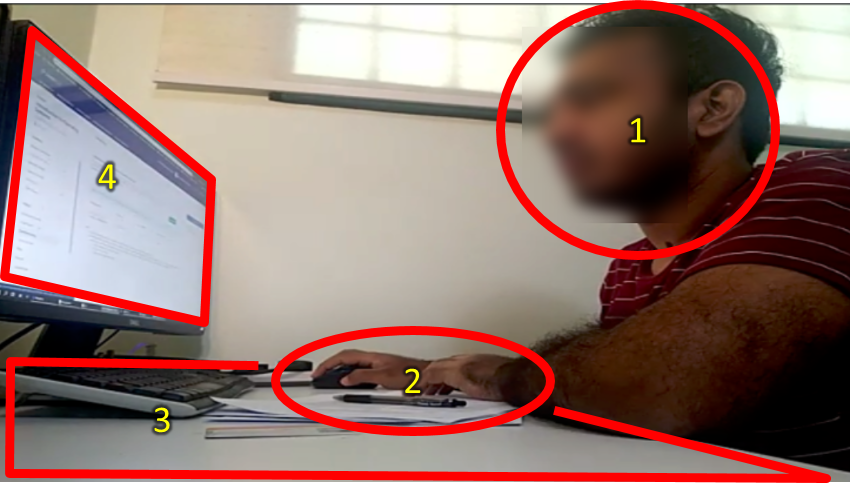
The webcam view should capture all four of these: your face (side view, no mask), your hands, the working area of the table, and the entire screen area of your active screen. Here is an example:
Recording of your PC screen is not required.
Only one computer screen allowed. If you have multiple screens, switch off except one. It is better if you can physically remove unused screens if possible e.g., do not keep a switched off tablet on the table.
You may split the screen though i.e., show module website in one half and the quiz in the other half.You may not use a second laptop/computer as the web cam. Use either an external webcam or a mobile phone instead. Reason: the screen of that second computer will not be captured in the video feed.
Not allowed to use the printer or other devices during the exam.
You may use headphones during the exam.
Soft copies of notes: only PDF format is allowed. Other formats (e.g., MS Word, .txt, html) are not allowed. No limitation on what the PDF file contains or the number of PDF files to be used.
You may use any hard copies or written materials too.The Browser should only be used to access LumiNUS and the module website (including relevant se-education.org pages e.g., Java coding standard). Accessing other websites is not allowed.
Do not use the browser to view PDFs. Reason: viewing PDF files in the browser makes it harder for invigilators to detect students accessing unauthorized websites.Use Zoom private messages to communicate with the invigilator. Use Microsoft Teams to communicate with the prof. Communicating with others is not allowed, except with NUS IT staff (for tech help).
The quiz will not appear on LumiNUS until a few minutes before we release the password. Wait until we announce that the quiz is available to see.
When the invigilator asks you to do an identity check, turn your face towards the camera (do not adjust the camera position), move closer to the camera, and hold the pose until the invigilator tells you to go back to your working position.
If you have a doubt/query about a question, or want to make an assumption about a question, please write it down in the 'justification' text box. Do not try to communicate those with the invigilator during the exam. We'll take your doubt/query/assumption into account when grading. For example, if many had queries about a specific question, we can conclude that the question is unclear and omit it from grading.
If you encounter a serious problem that prevents you from proceeding with the exam (e.g., the password to open the quiz doesn't work), PM the invigilator using Zoom private chat (failing that, MS Teams).
If your computer crashed/restarted during the exam, try to get it up again and resume the exam. LumiNUS will allow you to resume from where you stopped earlier. However, note that there is a deadline to finish the quiz and you will overrun that deadline if you lose more than 5 minutes due to the computer outage.
Consent to invigilator un-muting your mic without asking for your permission first if Zoom asks for your consent for that feature to be enabled. This will allow the invigilator to verify your compliance with 'no communications with others' rule, without disturbing you during the exam. This is an NUS requirement for exams.
Format
- The exam will be divided into 2 parts.
Final exam - part 1
- A LumiNUS quiz containing 16 MCQ questions. All questions are estimated to be equal size/difficulty.
- You only need to answer 15 questions correctly to get full marks. The extra question is there to cushion you against careless mistakes or misinterpreting a question.
- Questions will appear in random order.
- You will not be able to go back to previous questions.
Reasons:
1. to minimize opportunities for collusion
2. not unreasonable for the materials tested and the proficiency level expected -- i.e., when using this knowledge in a real life SE project discussion, it will be rare for you to go back to revise what you said earlier in the discussion - Duration: 45 minutes
- You are required to give a justification/rationale for your answer. The question will specify what should be included in the justification. Answers without the correct justification may not earn full marks. However, we'll give full marks up to two correct answers (per 16 questions) with missing/incorrect justifications (to cater for cases where you accidentally proceeded to the next question before adding the justification).
- Here is an example question. The answer is
aand the justification can beOOP is only one of the choices for an SE project.
Almost all questions will ask you to choose the INCORRECT statement and justify why it is incorrect.
There will be a 5-minutes toilet break after this part
Final exam - part 2
- Similar to part 1 (e.g., 16 questions, same length).
Exam briefing, mock exam, practice exam paper
- There will be an exam briefing in the penultimate lecture. It will include a minimal mock exam, just to help you understand the structure.
- You will be given a practice exam paper (at least half the size of the full paper) to help you practice timing. That practice paper will be released at least one week before the exam.